SayWhat Review (2026): Honest Pros, Cons, Pricing, and When It’s Worth It
An honest, hands-on SayWhat review. What it does well, where it falls short, current pricing, and who should (and shouldn’t) be using it in 2026.
There are dozens of LinkedIn content creation tools out there. SayWhat has received alot of attention so we reviewed it to see how it stacks up.
This SayWhat review is based on hands-on experience with the tool. Yes, we actually signed up and tested it ourselves. So this is not a surface-level feature list. It is an honest breakdown of what works, what doesn’t, and whether it’s the right fit depending on your use case.
The best way to save yourself time and money is to understand what you’re buying before you buy it. So here’s our insight into SayWhat and how it works.
Let’s get into it.
Looking for a side-by-side comparison? Read our full SayWhat vs Kleo breakdown.
Key Takeaways
- SayWhat is a comprehensive LinkedIn growth platform that covers writing, design, analytics, and engagement in one place.
- SayWhat is best for LinkedIn creators and executives who want an all-in-one platform with strong analytics, a visual design tool, and an active community.
- What SayWhat does best: The design feature (infographic and carousel generator), the Collab performance chatbot for analyzing past posts, and the Inspiration database with Braindump are genuine standouts.
- Where it struggles: SayWhat learns from your LinkedIn profile rather than from you directly. You cannot train it upfront on your personal experiences, topics you care about, or your broader knowledge beyond what LinkedIn shows. The AI-generated drafts also need editing before they’re ready to publish.
- How it fits into a broader system: SayWhat works well as a comprehensive LinkedIn workflow tool. But if you want a tool that learns from your call transcripts, blog posts, podcast appearances, and personal knowledge base to create content that is truly you, that’s where tools like Kleo take a fundamentally different approach.
SayWhat at a Glance
We scored SayWhat across nine categories based on our hands-on experience.
Overall: 4.0 / 5
SayWhat is a well-built LinkedIn platform that does content inspiration, analytics, and design really well. The Circle community adds genuine value that most competitors cannot match. Where it falls short is in deep personalization. The tool learns from your LinkedIn profile and posting history rather than from your broader knowledge and experience. That gap matters more the longer you use it.
Quick Verdict: Is SayWhat Worth It in 2026?
Here is a closer look at the three scenarios where that answer changes depending on what you are trying to build.
SayWhat is a strong all-in-one LinkedIn platform
You want a single tool that covers the full LinkedIn workflow, from inspiration and writing through design, scheduling, analytics, and engagement. SayWhat delivers breadth that most competitors do not. The design feature alone sets it apart.
The biggest limitation
SayWhat connects to your LinkedIn profile and learns from your posting history. That is valuable, but it is not the same as learning from you. You cannot train it upfront on your personal experiences, the topics that matter most to you, your tone of voice preferences, or knowledge from outside LinkedIn like call transcripts, blog posts, or podcast appearances.
This matters because your LinkedIn profile only shows your career history. Your personal brand is built on much more than that. If you want a tool that captures the full picture of who you are and what you know, SayWhat will feel limited over time.
When it’s worth the money
If you value having everything in one place and you especially want strong design capabilities (infographics, carousels) alongside analytics and community support, SayWhat at the Standard or Premium plan gives you solid value. The Collab performance chatbot and CSV export make the analytics genuinely useful for improving your content strategy.
What Is SayWhat?
SayWhat is an AI-powered LinkedIn growth platform founded by Will McTighe, a recognized LinkedIn creator and former Stanford MBA. The platform combines AI writing tools, visual design capabilities, content analytics, and community engagement features in a single dashboard built exclusively for LinkedIn.
It is trained on millions of LinkedIn posts to understand what performs well on the platform, and it learns each user’s voice and style from their LinkedIn posting history.
What problem does it solve?
Building a personal brand on LinkedIn involves a lot of moving parts. You need ideas, you need to write posts that sound like you, you need visuals that stand out, you need to stay consistent, you need to track what is working, and you need to engage with your community. Most creators cobble together three or four different tools to cover all of that.
SayWhat tries to consolidate the entire workflow into one platform. Open the app, find inspiration, write a post, add a visual, schedule it, track performance, engage with comments. All without leaving the tool.
That is the promise.
SayWhat Features Breakdown
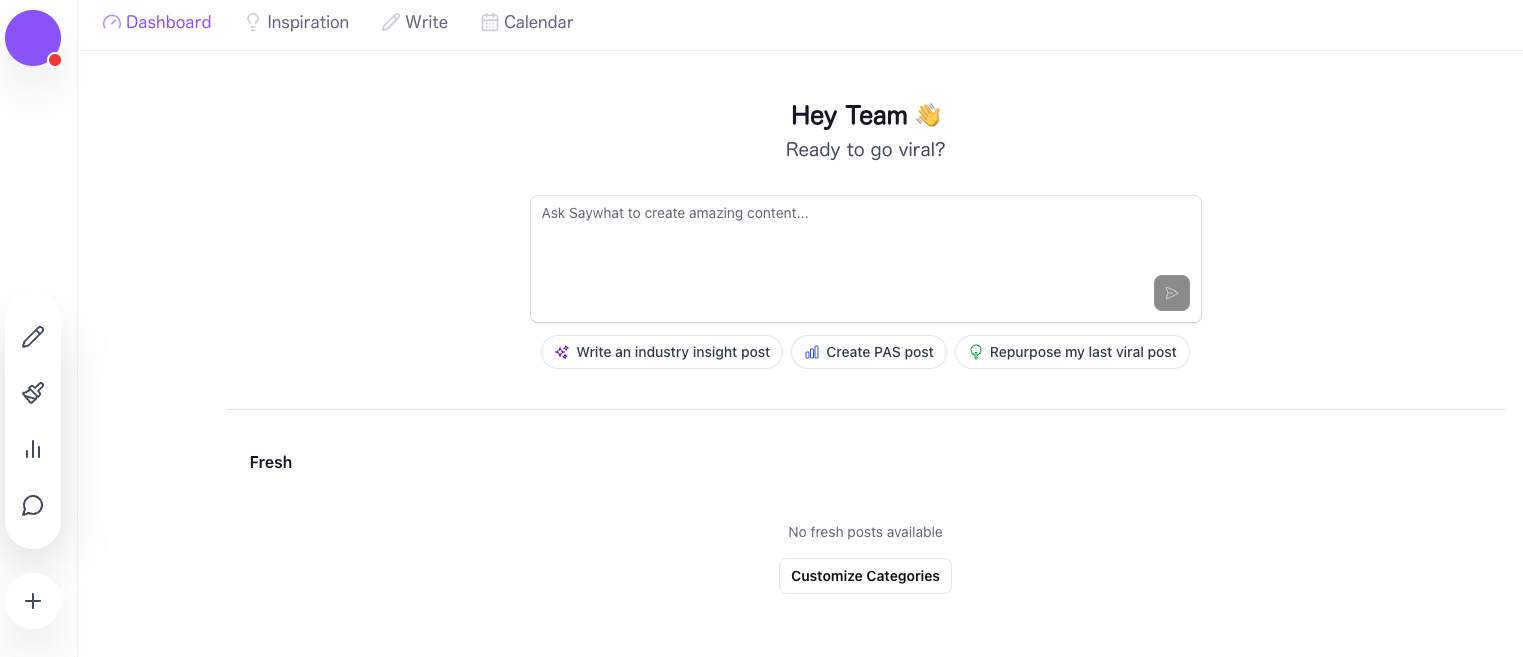
The SayWhat dashboard is clean and intuitive with four main sections accessible from the top navigation: Dashboard, Inspiration, Write, and Calendar. The left sidebar provides quick access to Design, Analytics, and the Engage inbox.
We reviewed the core features across SayWhat’s four pillars: Write, Design, Analyze, and Engage.
Write
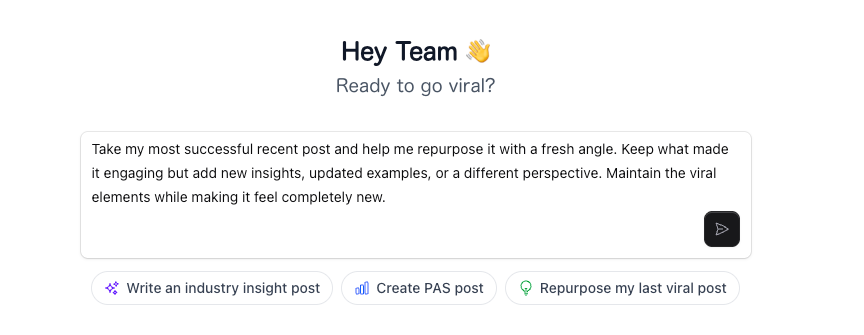
The write feature gives you the option to create a post through several approaches. You can use the Problem-Agitate-Solution (PAS) framework, write an industry insight post, or repurpose your last best-performing post. You can also type a free-form prompt to tell the Collab AI exactly what you want.
The Collab AI writing assistant is trained on your voice based on your LinkedIn posting history. It researches trending topics, analyzes what has worked for you before, and helps you draft posts that aim to sound like you wrote them.
The Braindump feature is a standout. You can add text, record audio, or paste a link. SayWhat saves it to your Inspiration section where you can search with filters and pull ideas when you are ready to write. This means you never lose a good idea and you never start from a blank page.
The platform also includes a post preview that shows how your content will render on LinkedIn before you publish.
Inspiration
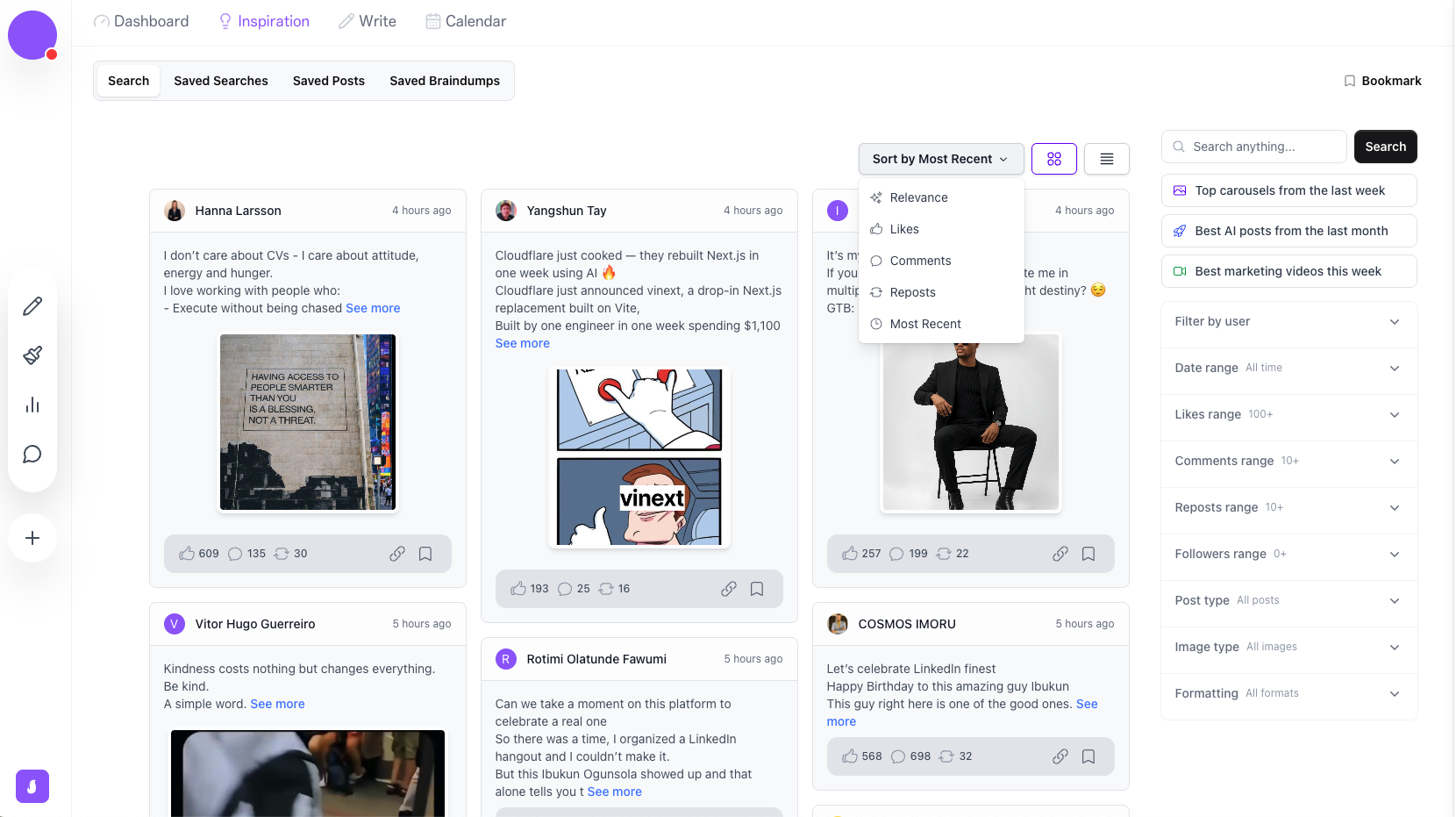
The Inspiration section is one of SayWhat’s strongest features. It pulls top-performing posts from across LinkedIn and lets you filter by relevance, likes, comments, reposts, and most recent. You can also filter by user, date range, likes range, comments range, reposts range, follower count, post type, image type, and formatting.
There are also suggested quick searches like top carousels from the last week, best AI posts from the last month, and best marketing videos this week.
You can save posts, save searches, and access your saved Braindumps all from the same section. This makes it a genuinely useful research hub, not just a random post library.
Design
.png)
This is one of SayWhat’s clearest differentiators.
The design feature includes an infographic generator that creates multi-slide carousels from a single prompt. It works in a Canva-like interface with themes and customization options. You type a topic and it generates a full visual breakdown you can download as PDF for LinkedIn.
Most competing LinkedIn tools offer nothing comparable in the visual content space. If visual content is a meaningful part of your LinkedIn strategy (and it should be, given how the algorithm favors carousels and infographics), this feature alone could justify the subscription for some users.
Worth noting: the infographic feature currently requires the Executive plan to access.
Analyze
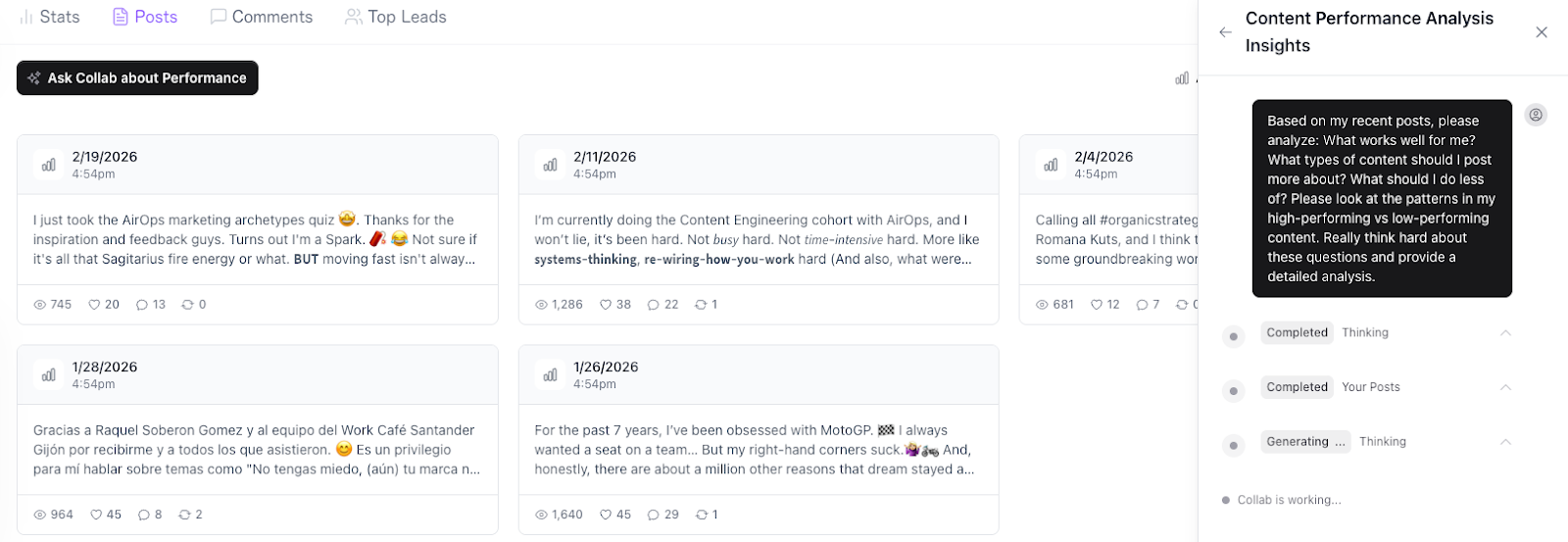
SayWhat’s analytics go well beyond what LinkedIn natively provides. The platform shows your posts with full engagement metrics (views, likes, comments, reposts) in a clean card layout. You can view Stats, Posts, Comments, and Top Leads from the analytics dashboard.
The standout feature here is the Collab performance chatbot. You can ask it to analyze your content performance, identify what types of posts you should create more of, what you should do less of, and find patterns in your high-performing versus low-performing content. It gives genuinely tailored feedback rather than generic advice.
The ability to download all your posts into Excel or CSV for analysis outside the tool is a major plus. If you like working with data in spreadsheets (and many serious creators do), this is a feature that most competitors do not offer.
Engage
SayWhat provides a streamlined comment inbox that organizes all engagement into two chronological feeds. One for people you follow in SayWhat, one for comments on your posts. The AI learns your commenting style and helps you respond faster while keeping responses personal.
The platform also includes Top Leads identification to help you spot your most engaged followers and turn engagement into business opportunities.
Community
SayWhat runs an active community on Circle. This is not just a support forum. It is a genuine value add that goes beyond the software itself.
The community includes sections for getting started, product feedback, asking for help, announcements, and a knowledge base. On the LinkedIn education side, there are channels for LinkedIn Content Trends, Roast My Post, Share Your Wins, Ask Me Anything, How to Write Posts, Profile Tips, Live Training, Recordings, and Design.
Multiple users credit the community and direct strategy sessions with founder Will McTighe as a major factor in their LinkedIn growth.
Additional free tools
SayWhat also offers a set of free LinkedIn creator tools that require no sign-up.
These include a LinkedIn Post Formatter, Billboard Generator, Video Downloader, LinkedIn Headline Generator, and a LinkedIn Summary Generator (marked as new). These are useful standalone utilities that give potential users a taste of the platform before subscribing.
SayWhat Pricing: What Do You Really Pay For?
Current pricing tiers
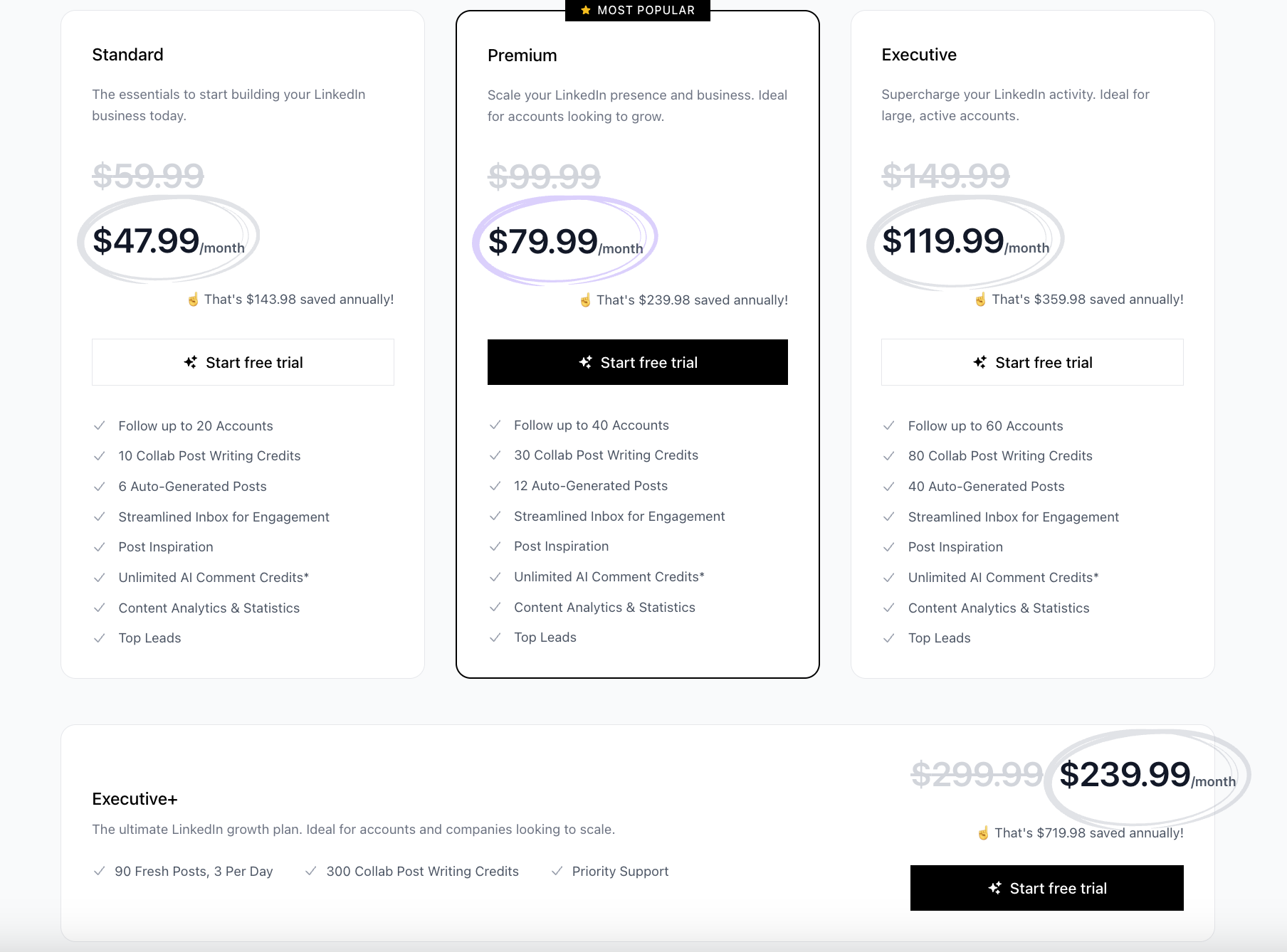
SayWhat offers four plans with annual billing discounts. All plans include a free trial, though it does require credit card details upfront.
Value vs effort required
- The Standard plan at $47.99/month gives you the basics: 10 Collab writing credits, 6 auto-generated posts, the inspiration database, analytics, streamlined inbox, and unlimited AI comment credits. For someone just getting started on LinkedIn, that can be enough.
- The Premium plan at $99/month triples your writing credits and doubles your auto-generated posts. If you are posting consistently and using the Collab feature regularly, you will likely need this tier.
- The Executive plan at $119.99/month is where you get access to the infographic design feature, 80 writing credits, and 40 auto-generated posts. But at almost $1,440 per year, it is a significant investment. That is nearly double what some alternatives charge for a comparable feature set.
- The Executive+ at $239.99/month is built for companies and power users who need 90 fresh posts (3 per day), 300 writing credits, and priority support.
The bottom line on pricing
SayWhat is not cheap. At the Standard plan it competes reasonably with other tools. But as you move up the tiers, the price climbs quickly. If the design feature and advanced analytics are important to you, you will need the Executive plan, and at that price point you should weigh carefully whether the value matches your needs.
Pros and Cons of SayWhat
What Do People Say About SayWhat?
Do not just take our word for it. SayWhat has testimonials from users who credit the platform with meaningful LinkedIn growth.
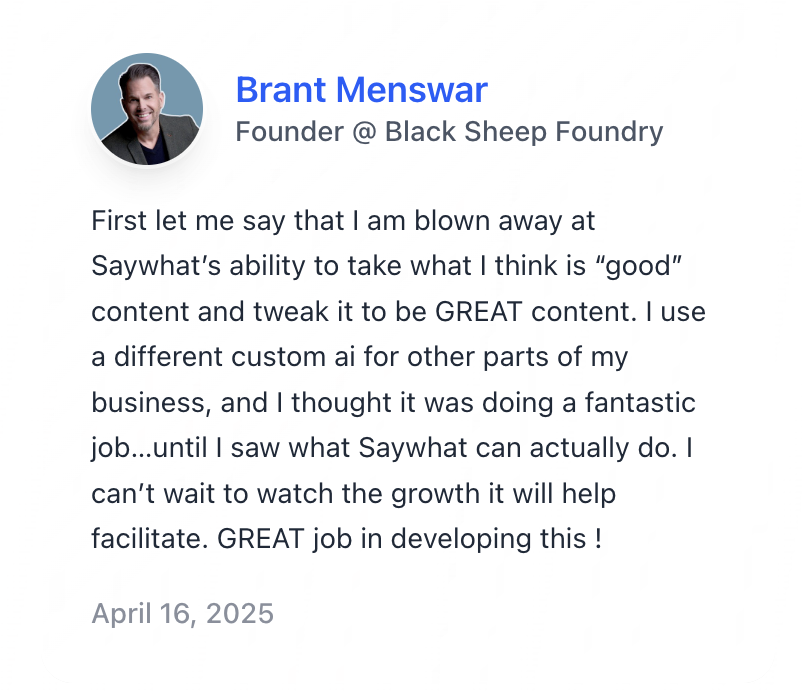
Users consistently highlight the Collab feature, the inspirational content database, and the community as the biggest value drivers. Several users report significant follower growth and time savings after adopting the platform. The community and direct access to founder Will McTighe come up repeatedly as differentiators that pure software tools cannot replicate.
Who Is SayWhat Best For?
SayWhat is a strong fit for a specific type of LinkedIn creator. Here are the use cases where it genuinely delivers.
LinkedIn creators who want everything in one place
If you are tired of juggling multiple tools for writing, design, scheduling, analytics, and engagement, SayWhat consolidates the full workflow. The breadth of the platform is its biggest strength.
Visual content creators
If carousels, infographics, and visual content are part of your LinkedIn strategy, SayWhat’s design feature gives you capabilities that most competitors simply do not offer. This alone can be a deciding factor.
Data-driven creators
The analytics dashboard with CSV/Excel export and the Collab performance chatbot give you genuine insight into what is working and what is not. If you like making content decisions based on data, SayWhat delivers here.
Community-oriented creators
The Circle community is active and adds real value beyond the software. If you want peer feedback, strategy discussions, and events like Roast My Post alongside your tool, SayWhat offers something most competitors do not.
Who SayWhat Is Not Ideal For
SayWhat has real strengths, but it is not built for everyone. Here is where those gaps tend to show up.
Creators who want deep personal brand training
SayWhat learns from your LinkedIn profile and posting history. It does not let you train it on your personal experiences, the topics that define you, your broader knowledge from call transcripts, blog posts, podcast appearances, or the stories that shape your perspective. If your personal brand is built on more than what shows up on your LinkedIn profile (and it should be), this is a meaningful limitation.
Budget-conscious users
While the Standard plan is competitively priced, the features that truly differentiate SayWhat (particularly the design feature) are locked behind higher tiers. At $119.99 to $149.99/month for the Executive plan, it is one of the more expensive options in the space.
Multi-platform marketers
SayWhat is built exclusively for LinkedIn. If you need to publish and manage content across LinkedIn, X, Instagram, and other platforms from a single tool, you will need to look elsewhere.
People who need publish-ready AI drafts
While the Collab AI is useful for ideation and getting a first draft out, the generated content typically needs editing before it is ready to publish. If you want AI output you can post with minimal changes, you may find yourself spending more time refining than expected.
Final Take: Should You Choose SayWhat or Look Beyond It?
SayWhat is a well-built, comprehensive LinkedIn platform. The design feature is genuinely impressive and rare in this space. The analytics with CSV export and the Collab performance chatbot are strong. The Circle community adds a layer of real human support that software alone cannot provide. And the Braindump feature for capturing ideas is clever and practical.
If your main challenge is having a full LinkedIn workflow in one place, and you especially value visual content creation and analytics, SayWhat can absolutely help with that. The Standard and Premium plans offer solid value for what you get.
But here is what I would want you to think about.
SayWhat learns from your LinkedIn profile. Not from you. It does not know about the call you had this morning that sparked an idea. It does not know about the blog post you wrote last year that perfectly captures your perspective on your industry. It does not know about the podcast episode where you told your founding story.
Your personal brand is built on all of those things. And the creators who are winning on LinkedIn in 2026 are the ones whose content sounds unmistakably like them, because it comes from their actual knowledge and experience, not just their LinkedIn posting history.
SayWhat helps you post. It helps you design. It helps you analyze. But it does not help you capture and deploy the full depth of who you are and what you know.
If you are at the stage where you need a solid all-in-one LinkedIn platform with great design tools, SayWhat is a strong choice. If you are at the stage where you need a thinking partner that learns from your knowledge base, writes with you and like you, it might be time to look at what Kleo offers instead.
Either way, the best tool is the one that matches how you actually work. Not the one with the longest feature list.
Interested in seeing how Kleo compares head-to-head?
Read the full SayWhat vs Kleo comparison.
Frequently Asked Questions
Is SayWhat better than other LinkedIn tools?
It depends on what you need. For design capabilities (infographics and carousels), analytics depth, and community support, SayWhat is one of the strongest options available. For deep AI personalization that learns from your broader knowledge and experience beyond LinkedIn, other tools like Kleo take a fundamentally different approach.
How much does SayWhat cost?
SayWhat has four plans: Standard at $47.99/month, Premium at $99/month, Executive at $119.99/month, and Executive+ at $239.99/month. All plans include a free trial (credit card required). Annual billing provides savings of $143.98 to $719.98 depending on the plan.
Does SayWhat offer a free trial?
Yes. SayWhat offers a free trial on all plans. You will need to provide credit card details to start the trial.
Does SayWhat have scheduling?
SayWhat includes a Calendar feature for scheduling posts. However, based on their support documentation, SayWhat does not currently support direct post scheduling to LinkedIn. The calendar functions as a content planning and organization tool.
What is the best alternative to SayWhat?
If your main need is an all-in-one LinkedIn platform with strong design and analytics, SayWhat is a solid choice. If what you really want is a tool that learns your voice from your full knowledge base (call transcripts, blog posts, notes, podcast transcripts), captures your experiences, and co-creates content that sounds like you, Kleo is built for exactly that.
Who founded SayWhat?
SayWhat was founded by Will McTighe, a LinkedIn creator and former Stanford MBA / Goldman Sachs professional. He is actively involved in the product and community, regularly hosting strategy sessions and content trend discussions with users.