EasyGen Review (2026): Features, Pricing + What We Love and What We Don't
Features, pricing, real pros and cons, and who should (and shouldn’t) use this LinkedIn AI post generator.
EasyGen has carved out a name for itself in the LinkedIn content tool space, largely because of its founder. Ruben Hassid built the tool after generating over 100 million views on LinkedIn, and that credibility has driven a lot of interest.
The pitch is simple: EasyGen uses real data from top-performing LinkedIn creators plus trending topic intelligence to help you write posts that get engagement. It runs as a Chrome extension, lives inside your browser, and is designed to make LinkedIn content creation fast and frictionless.
But at $59.99 per month for what is primarily a post generator, the question is whether it delivers enough value to justify the price when there are tools that do more for less.
We’ve used EasyGen in the past and recently attempted to sign up again to test the latest version. We ran into a persistent error when trying to connect our LinkedIn account (“Setup failed: Failed to execute ‘json’ on ‘Response’: Unexpected end of JSON input”), which prevented us from completing the current onboarding. So this review is based on our previous hands-on experience with the tool, combined with what’s publicly available about its current feature set.
Let’s get into it.
Looking for a side-by-side comparison? Check out our EasyGen vs Kleo comparison here.
Key Takeaways
- EasyGen is a LinkedIn-focused AI post generator built as a Chrome extension.
- It’s built by Ruben Hassid, a creator with 100M+ LinkedIn views, and uses data from top-performing creators.
- The tool includes post generation, trending topics, a creators list, a content calendar, and saved posts.
- It does not support carousel creation, multi-platform publishing, or advanced analytics.
- At $59.99/month it’s on the higher end for a tool that’s primarily a post generator.
- A 7-day free trial is available, which is a positive.
Quick Summary
EasyGen does one thing and it does it with focus: generate LinkedIn posts quickly. The Chrome extension approach means there’s no dashboard to learn and no platform to navigate. You install it, connect your LinkedIn, and start generating.
Where it gets interesting is the data layer underneath. EasyGen draws on real performance data from top LinkedIn creators, which means the content it generates is informed by what actually works on the platform. The trending topics feature and creators list add a research layer that most basic post generators lack.
Where it falls short is in everything beyond post generation. There’s no knowledge base that builds over time. No image creation. No carousel support. No deep analytics. No comprehensive onboarding process. And the Chrome-only dependency means if you’re not on Chrome, you’re out of luck.
If you’re looking for a complete content system that learns your voice, stores your knowledge, and takes you from idea to published post with visuals and scheduling, Kleo is built for that.
EasyGen at a Glance
EasyGen is a fast, focused LinkedIn post generator with a strong data foundation. But its limited feature set and higher price point compared to more complete tools hold it back from being a full content solution.
Overall: 3.5 / 5
What Is EasyGen?
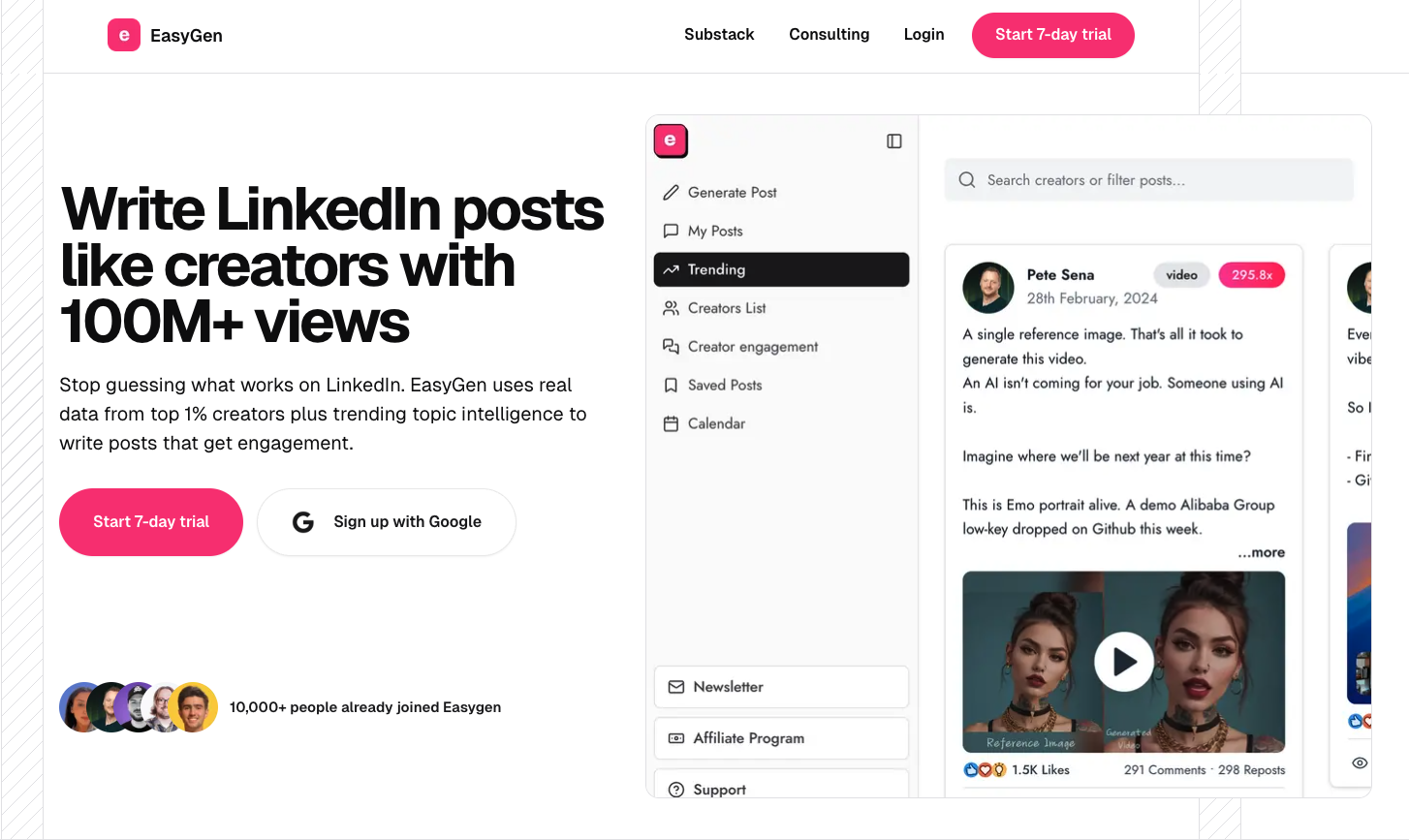
EasyGen is an AI-powered LinkedIn content generator that operates as a Chrome extension. It was built by Ruben Hassid, a LinkedIn creator who achieved over 100 million views on the platform and used those learnings to build a tool around what actually drives engagement.
The tool positions itself with a clear message: stop guessing what works on LinkedIn. EasyGen uses real data from top 1% creators plus trending topic intelligence to write posts that get engagement.
From the interface, EasyGen is organized around several core areas:
- Generate Post: The primary AI writing feature
- My Posts: Draft management and post history
- Trending: Discover what topics are performing right now
- Creators List: Browse and learn from successful LinkedIn creators
- Creator Engagement: A feature for engaging with other creators’ content
- Saved Posts: Save content for inspiration and reference
- Calendar: A content calendar for planning and scheduling
EasyGen Features Breakdown
1. AI-powered post generation
This is EasyGen’s core feature. You input a topic, and the AI generates a LinkedIn post based on data from high-performing creators and trending content patterns.
EasyGen claims to learn your tone, intensity level, and the kinds of examples you use, so posts sound like “you on your best day.” You can also generate posts from multiple formats including text, images, audio, and PDFs, which makes it useful for repurposing existing content.
The writing style customization allows you to adjust tone and context. There’s also a voice note dictation feature, where you can speak your ideas and have the AI turn them into structured posts.
The output is generally solid for quick, engagement-optimized LinkedIn content. But like most prompt-based tools, the posts can feel formulaic over time if you’re not actively editing and personalizing the output.
2. Trending topics
EasyGen pulls trending topics from across Reddit, X (Twitter), Google, and other sources, surfacing what’s generating conversation right now.
This is a genuinely useful feature for creators who struggle with “what should I post about today?” Instead of guessing, you can see what’s trending in your niche and use it as a starting point for content.
It’s not the deepest research tool out there, but for quick topic discovery, it does the job.
3. Creators list and creator engagement
The Creators List lets you browse and follow successful LinkedIn creators directly within EasyGen. You can study what they’re posting, how their content is structured, and what’s driving engagement for them.
The Creator Engagement feature takes this a step further by giving you a centralized view of posts from creators you follow, making it easier to engage with their content without scrolling through your entire LinkedIn feed.
Both features serve the same purpose: helping you learn from what’s already working on the platform and engage strategically with relevant creators.
4. Content calendar and saved posts
EasyGen includes a content calendar for planning and scheduling posts. It’s worth noting that EasyGen made a deliberate decision not to auto-post on your behalf, citing that manual posting tends to perform better in terms of reach. So the calendar functions more as an organizational and planning tool.
The Saved Posts feature works as a content library, allowing you to bookmark posts from other creators for later reference and inspiration.
Both features are functional but not especially deep. If you’re used to more robust scheduling and content management tools, you may find this limited.
5. Topic idea generator
EasyGen can generate suggested topics based on your niche and what’s performing well for similar creators. This is useful for brainstorming sessions where you need a starting point, though the quality varies depending on how well the AI understands your specific space.
EasyGen Pricing (2026)
What does EasyGen cost in 2026?
The 7-day free trial is a positive. It’s enough time to test the post generation and get a feel for the tool. Three free posts before committing to the trial is also a nice touch, though three posts may not be enough to fully evaluate the quality of output.
At $59.99/month, EasyGen sits on the higher end of the market for a tool that is primarily a post generator. For context, Kleo is $99/month but includes a full content and personal branding system with a knowledge base, scheduling, image creation, templates, and analytics.
The pricing is not unreasonable if EasyGen’s data-driven approach to content generation is the main thing you’re after. But if you need a broader toolkit, you may find yourself paying for EasyGen plus additional tools to fill the gaps.
EasyGen Pros and Cons
What people have to say about EasyGen?
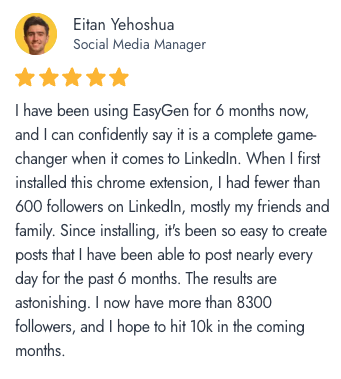
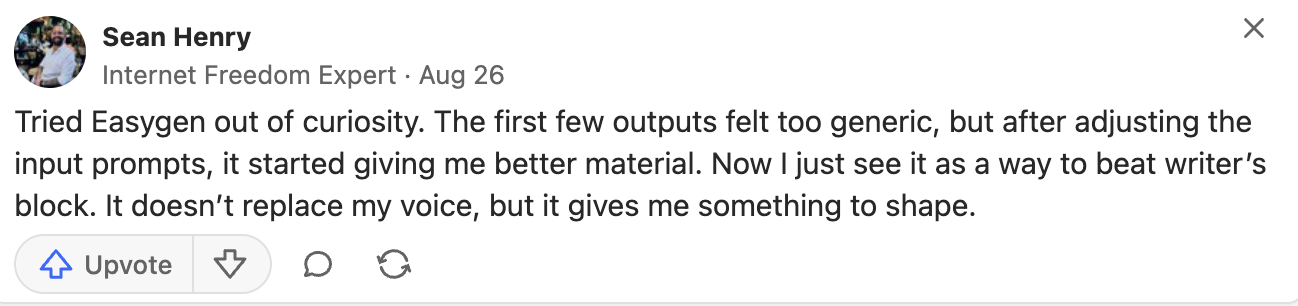
EasyGen get's mixed reviews but we suggest you check them out for yourself. Reviews say that the interface could be more intuitive, but overall solid tool for social media content creation.
Who Is EasyGen Best For?
- Solo creators and consultants who post frequently on LinkedIn and need speed
- Professionals who want data-informed content rather than generic AI output
- Users who prefer a lightweight Chrome extension over a full platform
- Creators who want trending topic discovery built into their workflow
EasyGen is not ideal for
- Creators building a distinctive personal brand voice that compounds over time
- Users who need a complete content workflow (knowledge base, image creation, scheduling, analytics)
- Anyone who needs multi-platform content support
- Users on browsers other than Chrome
- Teams or agencies managing multiple profiles
EasyGen Alternatives: How EasyGen Compares to Other LinkedIn Tools?
EasyGen operates in a crowded space. Here’s how it stacks up against the other major players.
EasyGen vs Kleo
EasyGen generates posts from data. Kleo generates posts from you. That’s the fundamental difference. EasyGen knows what works on LinkedIn in general. Kleo is trained on your identity, your writing style, your experiences, and your knowledge base. Kleo also includes scheduling, image creation, templates, swipe files, and analytics that EasyGen lacks. For $30 more per month, the feature gap is significant.
EasyGen vs Taplio
EasyGen is faster and more focused than Taplio. If all you want is to generate posts quickly using data from what’s already working on LinkedIn, EasyGen delivers that with less complexity. But Taplio gives you significantly more for similar or lower money, especially at the Starter level. The choice comes down to what type of tool you're looking for.
EasyGen vs Magic Post
Both Magic Post and Easy Gen tools focus on LinkedIn execution. Magic Post offers more at the same price point: scheduling, analytics, and an idea discovery engine. EasyGen’s advantage is its data foundation from top creators and trending topics intelligence. If you value speed and trend awareness, EasyGen has an edge. If you want a more complete execution toolkit, Magic Post delivers more features per dollar.
EasyGen vs Stanley
Stanley is an AI content advisor priced at $149/month with no free trial. It takes a completely different approach, acting as a conversational coach that helps you think about what to post rather than generating content directly. Stanley includes post analysis, an interview feature, and strategic guidance, but no scheduling, no templates, and no content calendar.
If you need content produced quickly, EasyGen is the practical choice. If you want someone (or something) to challenge your content thinking, Stanley fills that role, at a steep premium.
EasyGen vs AuthoredUp
AuthoredUp is the most affordable tool in this comparison at $19.95/month. It operates as a Chrome extension (like EasyGen) but focuses on formatting, scheduling, and analytics rather than AI content generation. Rich text editing, post previews, a content calendar, and detailed performance tracking are its strengths. EasyGen and AuthoroedUp complement each other more than they compete. If budget allows, some creators opt for both.
EasyGen vs Competitors: Quick Comparison
Final Verdict
EasyGen is a focused, fast LinkedIn post generator with a credible foundation. The data from top creators and trending topic intelligence give it an edge over generic AI writers. The Chrome extension approach keeps things simple and the 7-day trial lets you test before you commit.
What it does well:
- Generate LinkedIn posts quickly using real performance data
- Surface trending topics from across multiple platforms
- Provide a research layer through the creators list and saved posts
- Offer a lightweight, fast workflow that lives inside your browser
What it doesn’t do:
- Build a knowledge base that learns about you over time
- Create images or visual content
- Provide comprehensive analytics or performance tracking
- Support carousel creation
- Work outside of Google Chrome
If you post frequently on LinkedIn and want a fast, data-informed way to generate content, EasyGen delivers on that promise. It’s a solid post generator.
But if you want a full content system that learns your voice, stores your knowledge, creates visuals, and helps you publish consistently, you’ll outgrow EasyGen quickly. That’s where a tool like Kleo, which acts as a complete personalized content assistant, becomes the better long-term investment.
If you want a thinking partner that compounds over time, you’ll eventually outgrow it. Check out Kleo.
Frequently Asked Questions
Who founded EasyGen?
EasyGen was created by Ruben Hassid after he generated over 100 million views on LinkedIn. The tool uses data from top-performing creators and trending topic intelligence to help users write engaging LinkedIn posts quickly.
How much does EasyGen cost?
EasyGen costs $59.99 per month or $599.88 per year (which works out to roughly two free months on the annual plan). There is a 7-day free trial and you can generate three posts for free before the trial begins.
Does EasyGen learn your writing style over time?
EasyGen offers writing style customization where you can adjust tone and context. It claims to learn your tone and intensity level. However, it does not build a persistent knowledge base or long-term memory system the way some competitors do. Each session relies on the style settings you’ve configured rather than compounding learning from your past usage.
Does EasyGen work on browsers other than Chrome?
No. EasyGen functions exclusively as a Google Chrome extension. If you use Firefox, Safari, or another browser as your primary, you will not be able to use EasyGen without switching to Chrome.
Does EasyGen support carousel posts?
No. EasyGen is focused on text-based LinkedIn post generation. It does not include carousel creation or advanced visual design tools. If carousels are a significant part of your LinkedIn strategy, you will need a separate tool.
What is the best alternative to EasyGen?
It depends on what you need. If you want a complete content system that learns your voice, builds a knowledge base, includes image creation and scheduling, and adapts over time, Kleo is the most comprehensive alternative.